With your permission we load Google Analytics, Microsoft Clarity and the Meta and LinkedIn advertising tags, to see how the site is used and to measure our ads. Nothing loads unless you accept. Privacy policy
We built a complete HRMS and payroll platform for a multi-campus education company in Kerala: a web console for HR, self-service for staff, a mobile app with GPS punch, and live biometric attendance, all feeding one payroll run.
A growing education company in Kerala ran HR for several campuses the way most growing companies do: an attendance sheet per office, a biometric machine whose logs had to be exported by hand, leave requests on WhatsApp, and a payroll spreadsheet that only one person fully understood.
They did not want another off-the-shelf HR tool with workarounds for their own rules. They wanted one system that knew their working day, their leave policy and their salary structure, so that the numbers on the payslip could be traced back to the punches and approvals behind them.
We designed and built HRMS Suite for them: a web console for HR and managers, an Android and iOS app for every employee, and a live connection to the biometric devices already on the walls. Everything runs on one API and one database, so there is exactly one version of each employee, each day and each salary.
Project snapshot
Industry
Education (multi-campus, Kerala, India)
Platforms
Web app (admin and self-service), Android and iOS app, biometric devices
Users
HR admins, managers, employees
Scope
11 modules, from onboarding to final settlement
Stack
Next.js, NestJS, PostgreSQL, React Native (Expo)
Our role
Product design, engineering, deployment, support
01 // THE CHALLENGE
HR across campuses, run on spreadsheets.
The client ran HR across several campuses with spreadsheets, a standalone biometric machine and manual payroll.
01
Attendance in three places
Office staff, field staff and biometric logs never met in one record.
02
Leave and approvals by message
No balances, no audit trail, slow sign-off.
03
Payroll took days
Loss of pay, loans and advances were calculated by hand every month.
04
No self-service
Staff asked HR for every payslip, balance and letter.
05
Sensitive data in sheets
Bank and ID details sat in unprotected files.
02 // OUR SOLUTION
Every punch, leave and loan, straight into payroll.
One HRMS where attendance, approvals and loans flow into the monthly payroll run and on into the accounts. Want one built around your own policies? See our HRMS and payroll software development service.
01
Organization
Offices, departments, designations and holiday calendars per campus.
02
Employees and onboarding
Digital employee records, onboarding checklists and secure documents.
03
Attendance
Web punch, GPS mobile punch and biometric, with automatic day close.
04
Leave management and approvals
Balances, accruals and one approval inbox for every request.
05
Payroll
Monthly run from compute to approve to publish, with PDF payslips.
06
Loans and advances
EMI schedules and advances deducted automatically in payroll.
07
Accounts
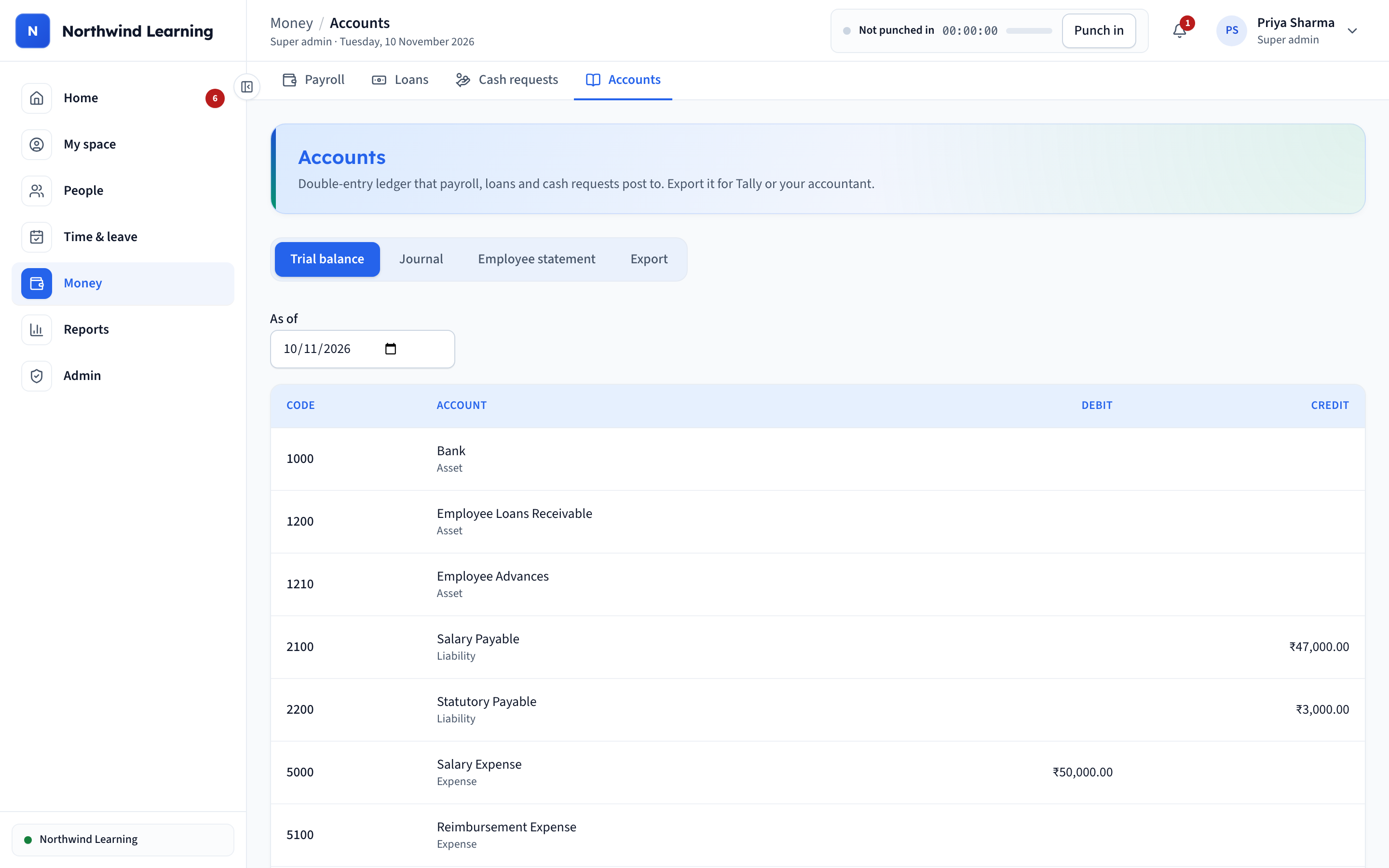
Double-entry ledger, trial balance and Tally export.
08
Resignation and exit
Notice period, exit checklist and full and final settlement.
09
Biometric integration
eSSL and ZKTeco devices push punches live, with duplicate protection.
10
Reports and dashboards
Headcount, attendance exceptions, leave and loan reports in CSV.
11
Mobile app
Punch, leave, payslips, loans and notifications for every employee.
03 // THE WEB APP
What HR sees, screen by screen.
01
A dashboard that tells HR what to do next
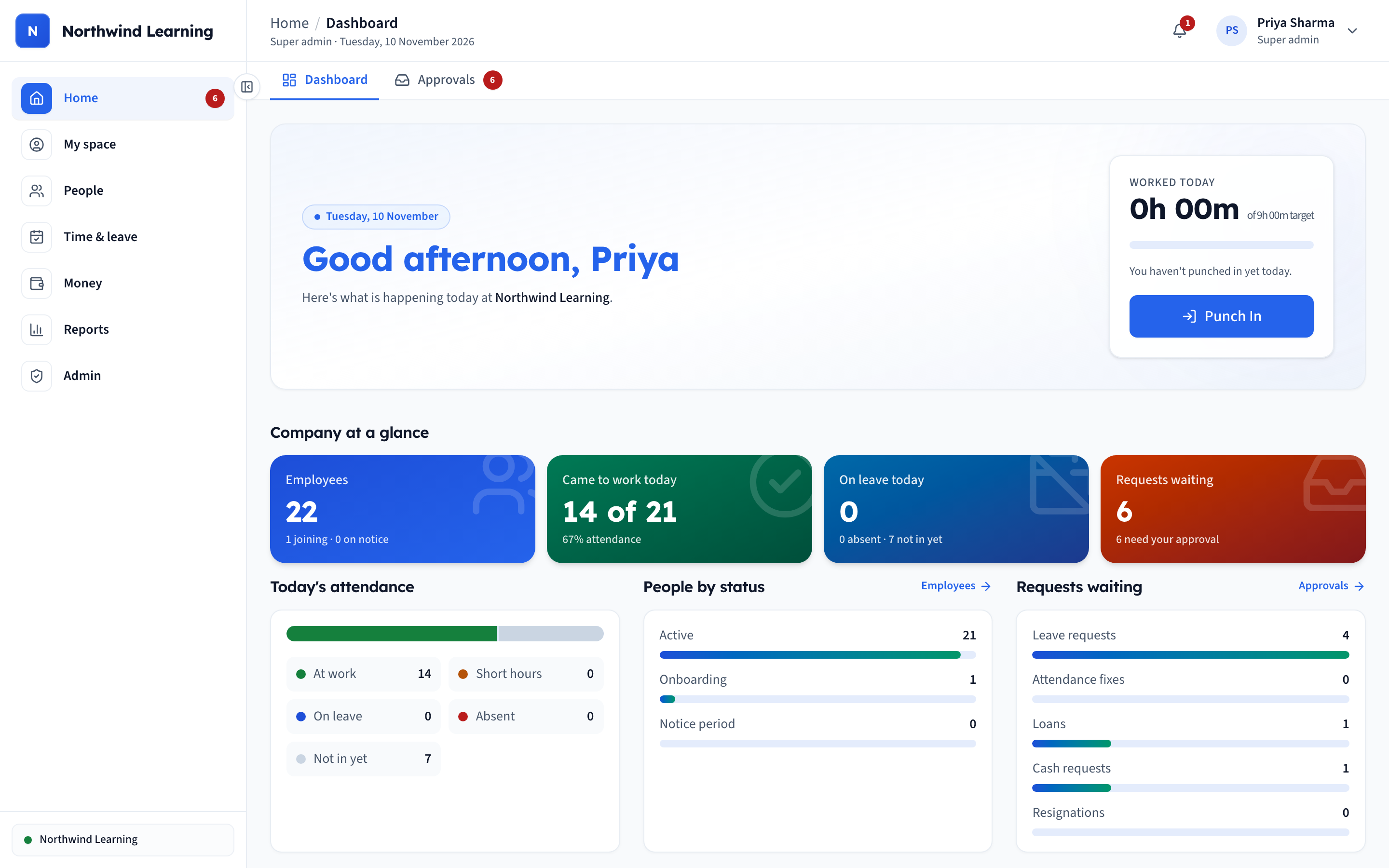
Live hours worked, one-tap punch, and a “Needs your attention” list for pending payroll and missing punches. Headcount, who is in today and who is on leave sit on the same screen, so the day starts with what needs doing.
02
Every employee record in one place
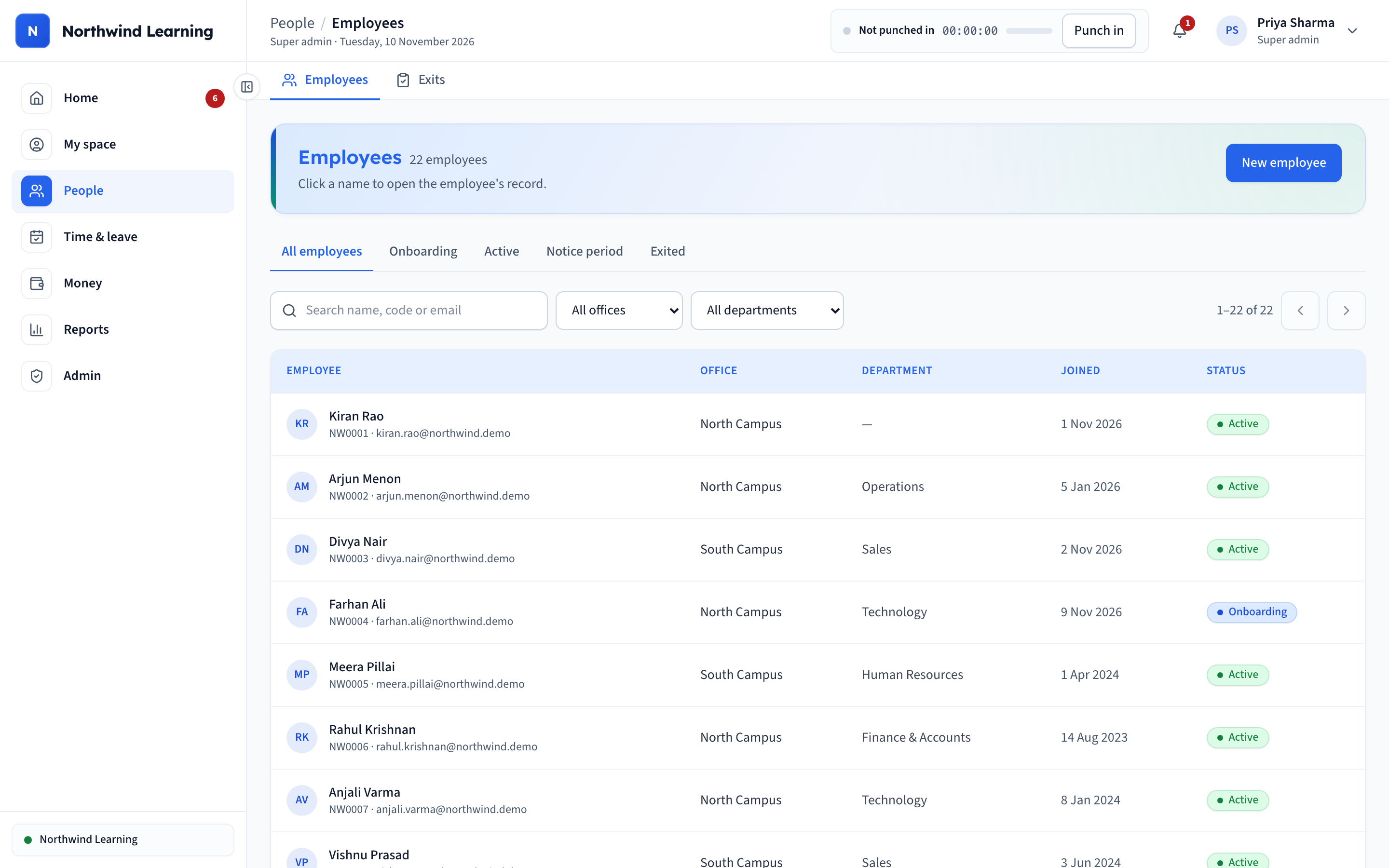
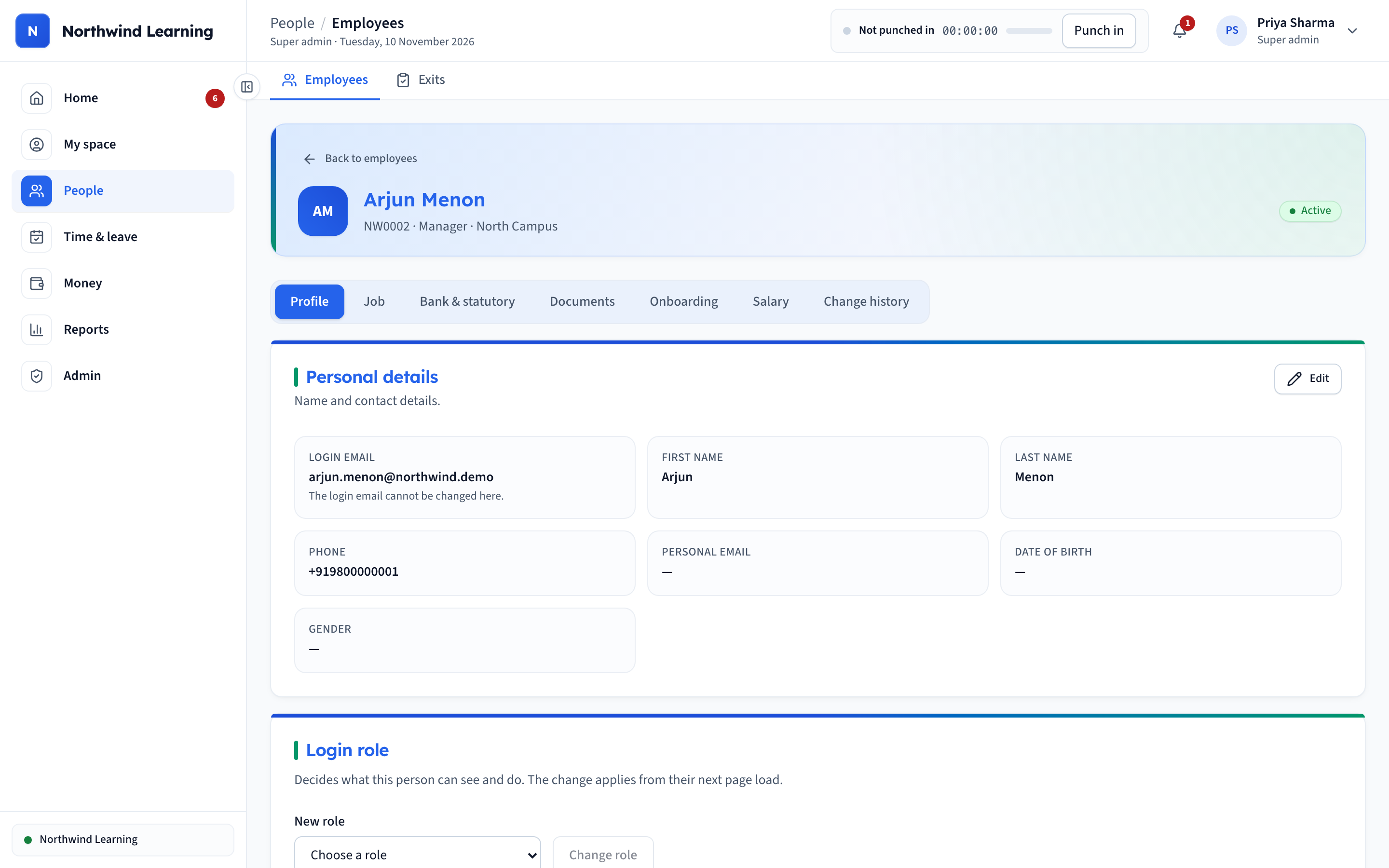
Search and filter by campus, department and status. Profiles hold job, bank, documents, onboarding and salary history. Bank details are encrypted and ID numbers are masked for everyone except the super admin.
03
Biometric and GPS attendance in one record
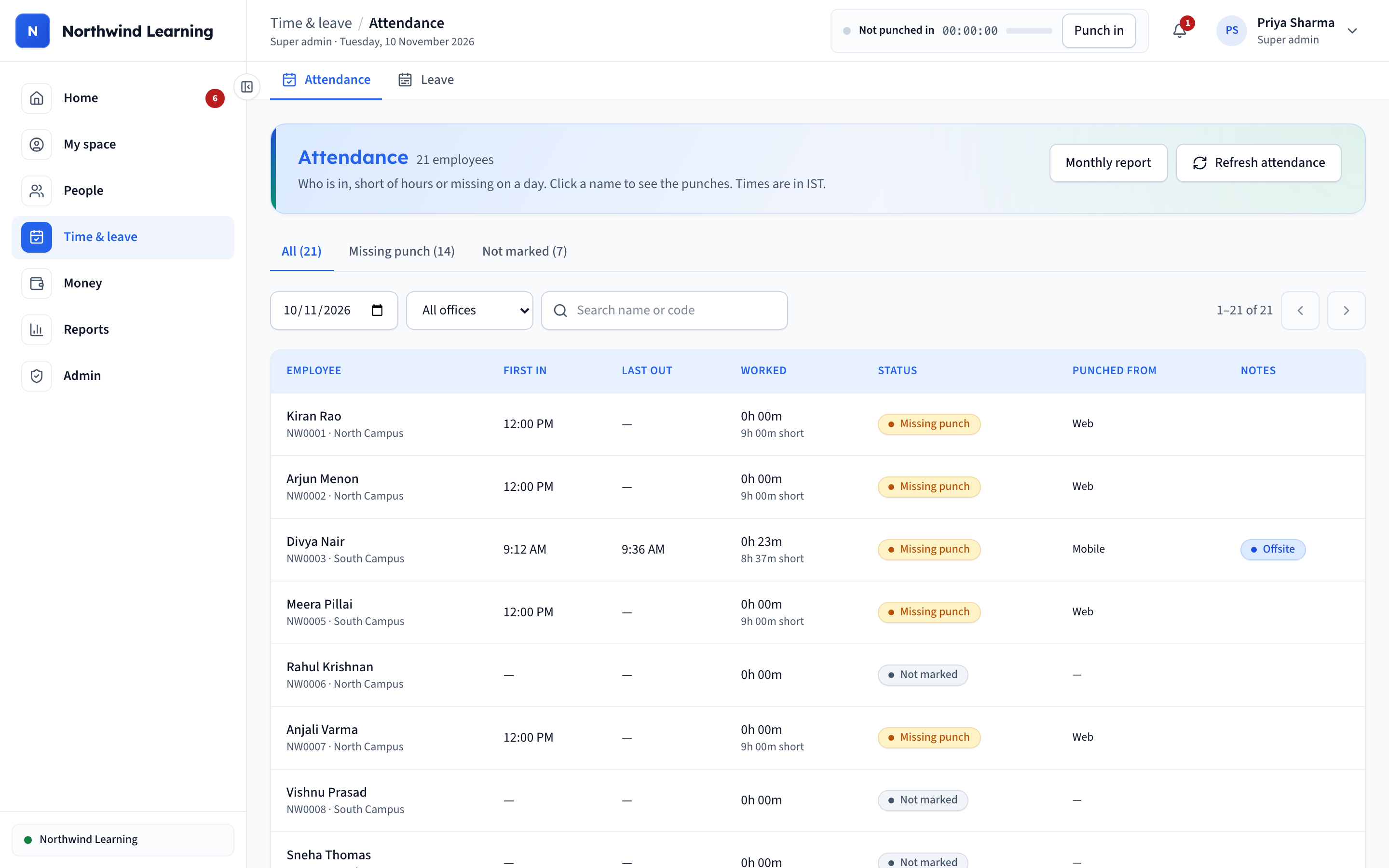
One daily board shows who is in, hours worked and where they punched from, including GPS-verified offsite punches. Biometric, web and mobile punches sit side by side, labelled by source.
04
Monthly attendance report
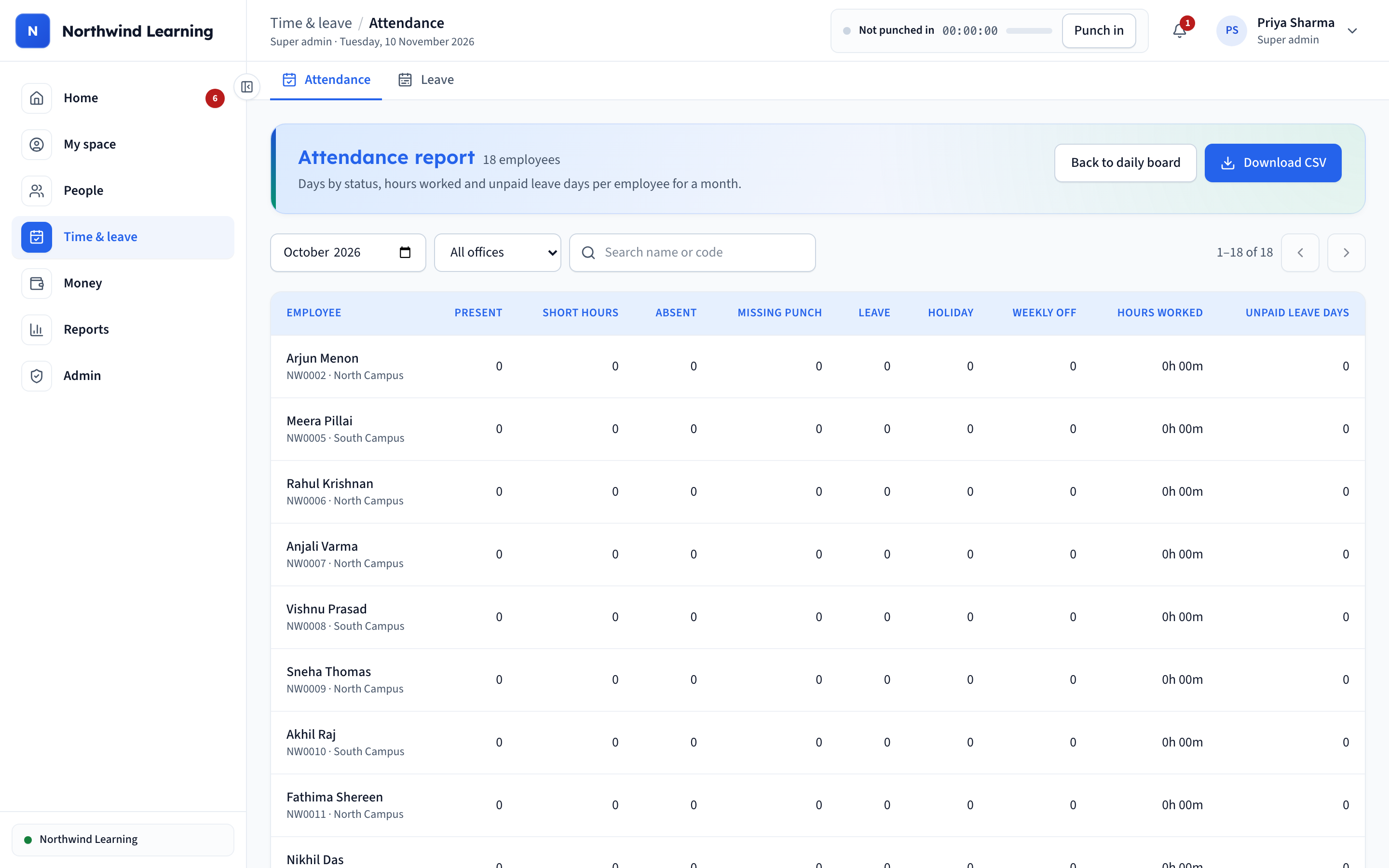
Present, short-hours, absent and unpaid days per person, ready to download as CSV. These are the same figures payroll uses, so the report and the payslip always agree.
05
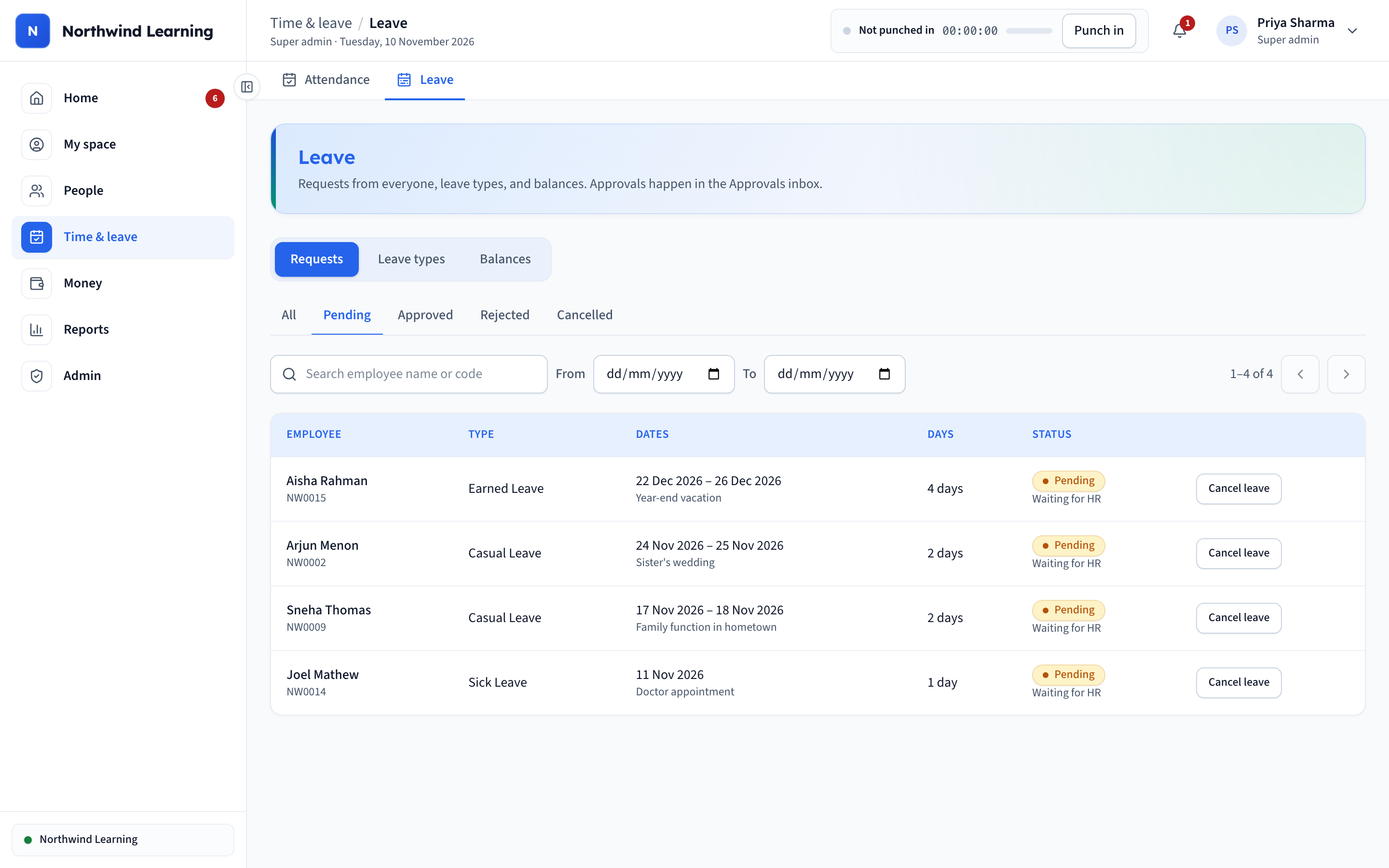
One approval inbox
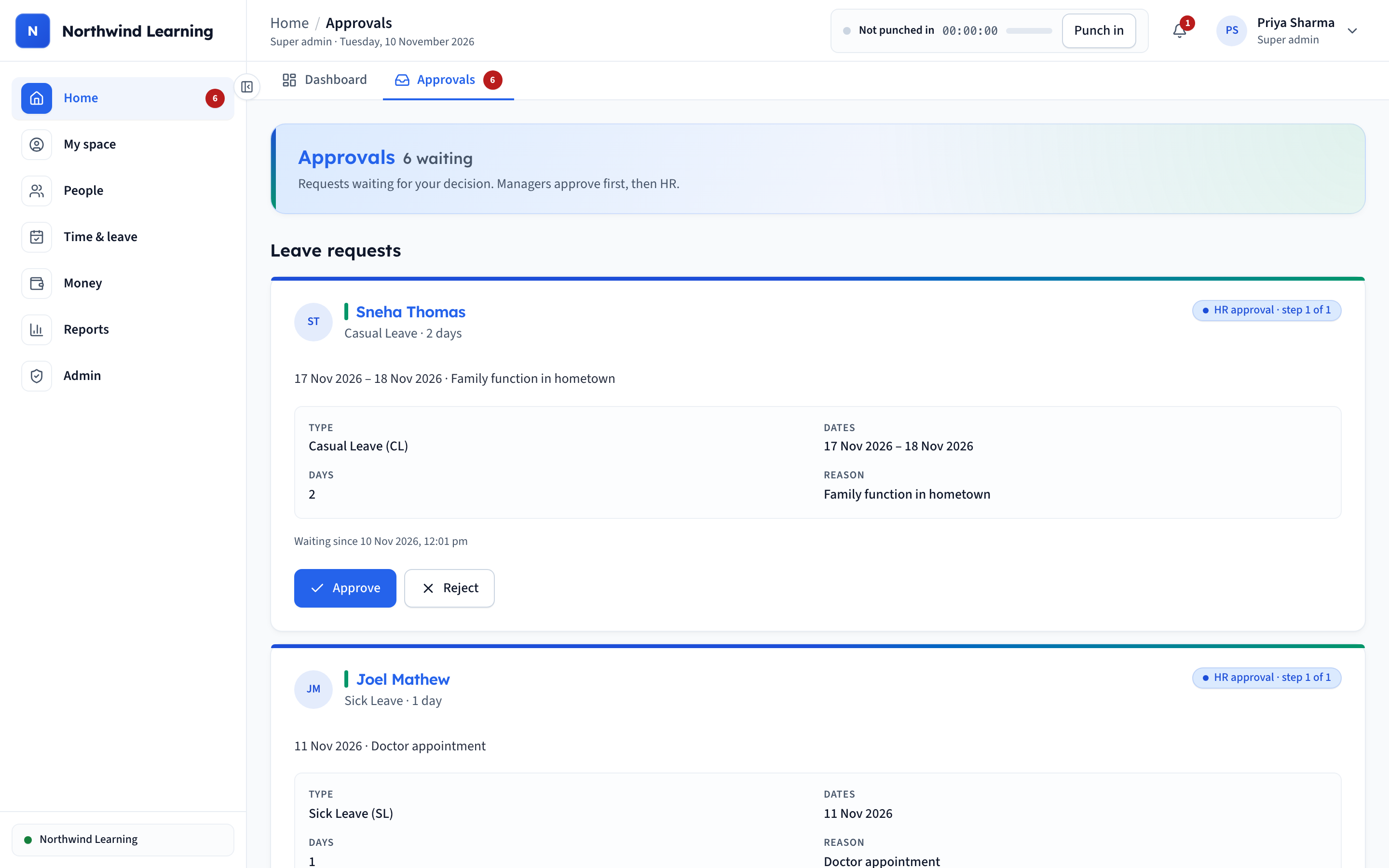
Leave, loans and cash requests go to the manager first, then HR, with full context on each card: dates, balance left and the reason given. Nothing is approved in a chat thread any more.
06
Leave management
Requests, leave types and balances with automatic monthly and yearly accrual. Every change to a balance is a line in a leave ledger, so a disputed balance can be explained entry by entry.
07
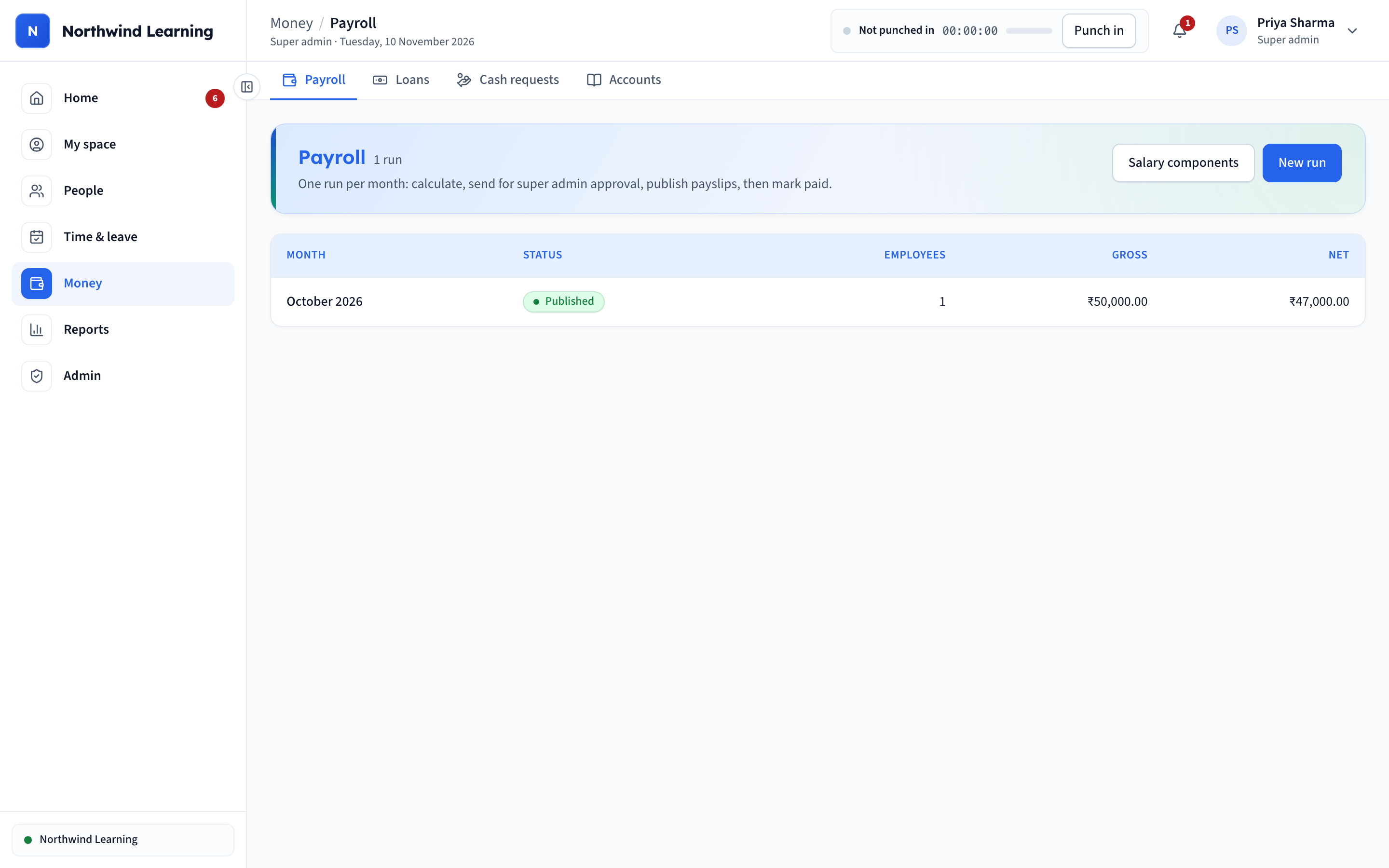
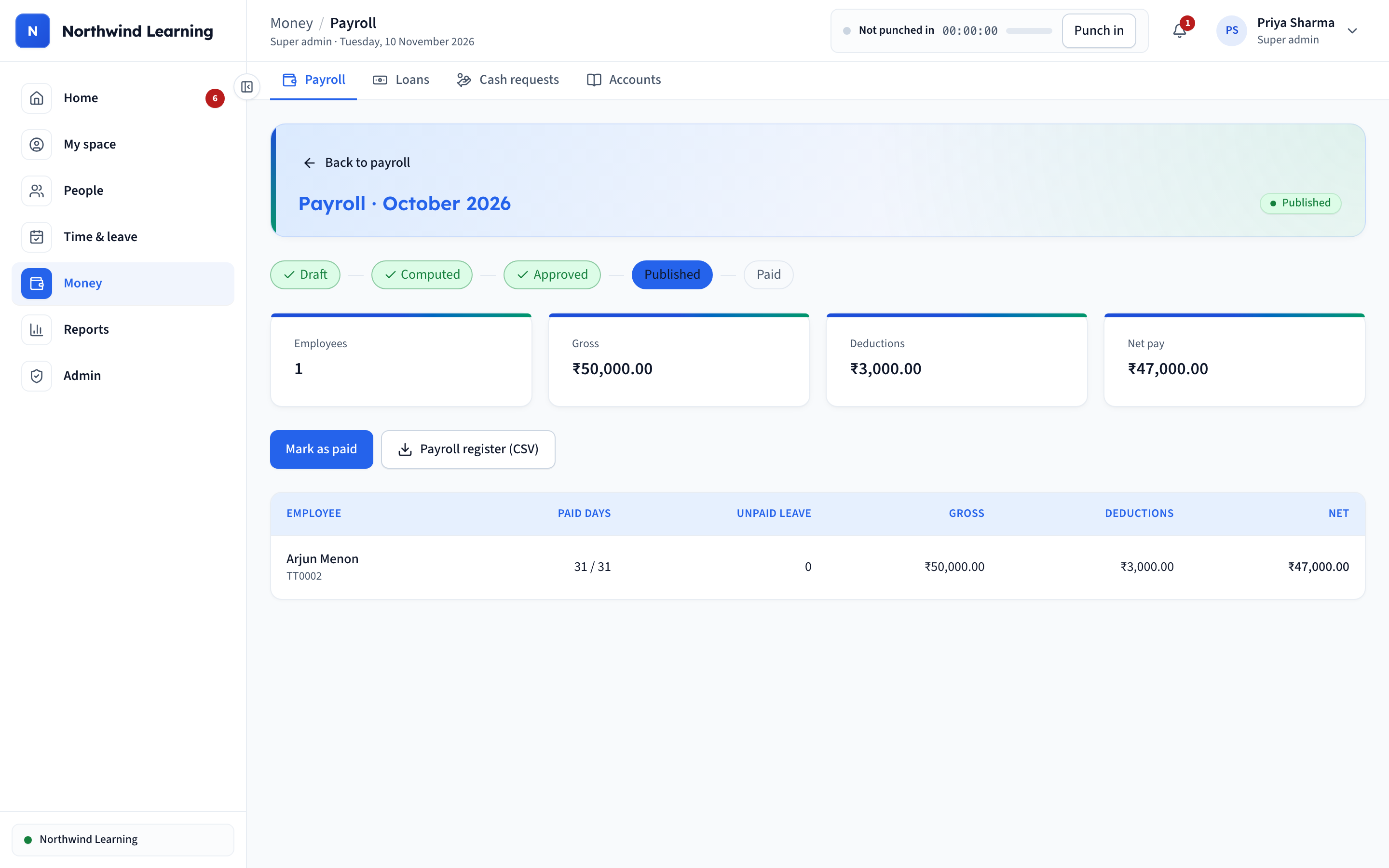
Payroll in four clicks
Compute, approve, publish payslips and mark paid. Unpaid leave, loan EMIs and salary advances are applied automatically, and the super admin signs off before anyone sees a payslip.
08
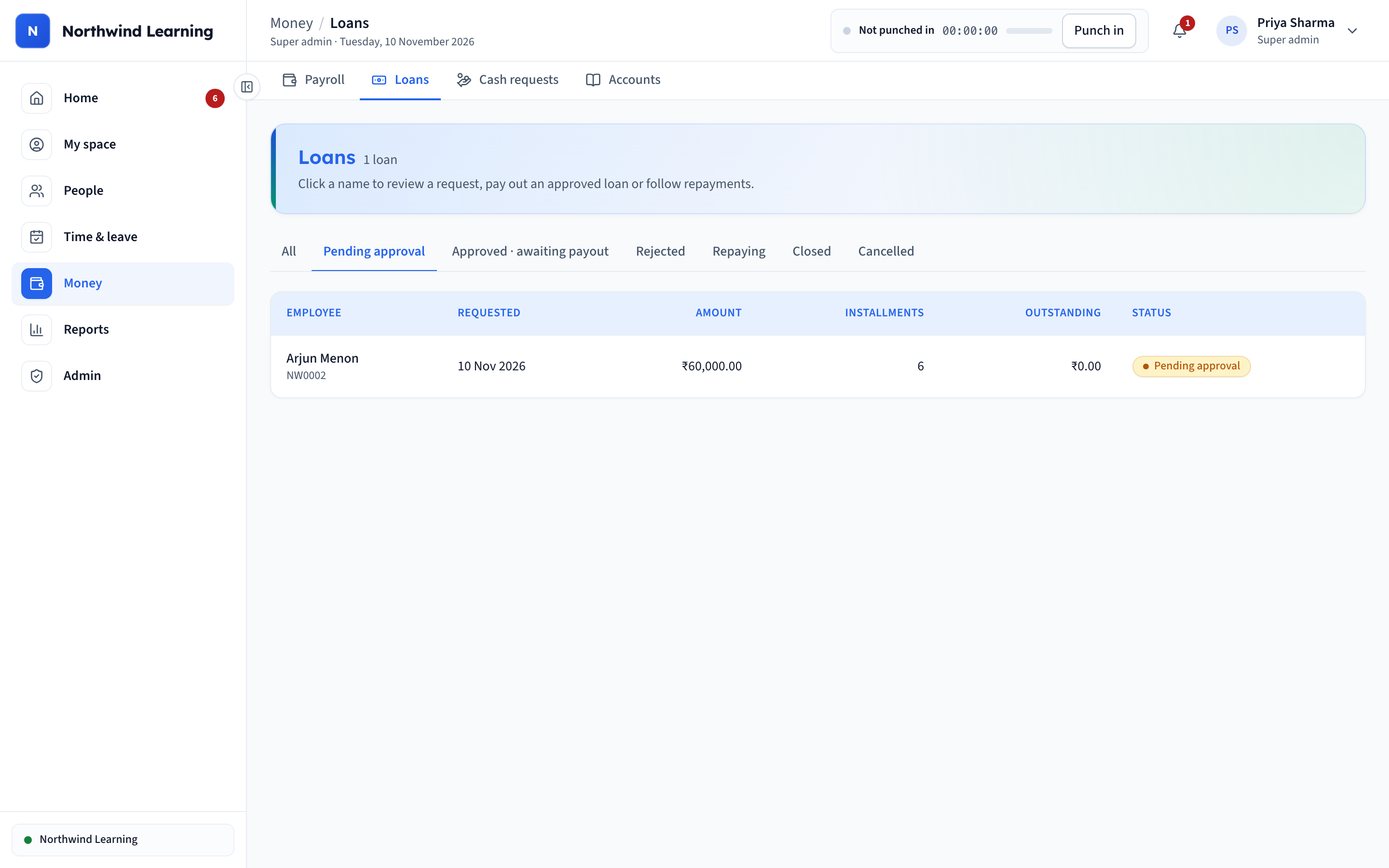
Loans and advances
Employees request loans from the app. Approved EMIs are deducted from salary until the loan is closed. Salary advances are recovered from a later payroll, and expense claims are paid with one.
09
Built-in accounts
Every payroll, loan, advance and final settlement posts to a double-entry ledger, with a trial balance and a CSV export for Tally. The accountant gets journals, not spreadsheets.
10
Reports
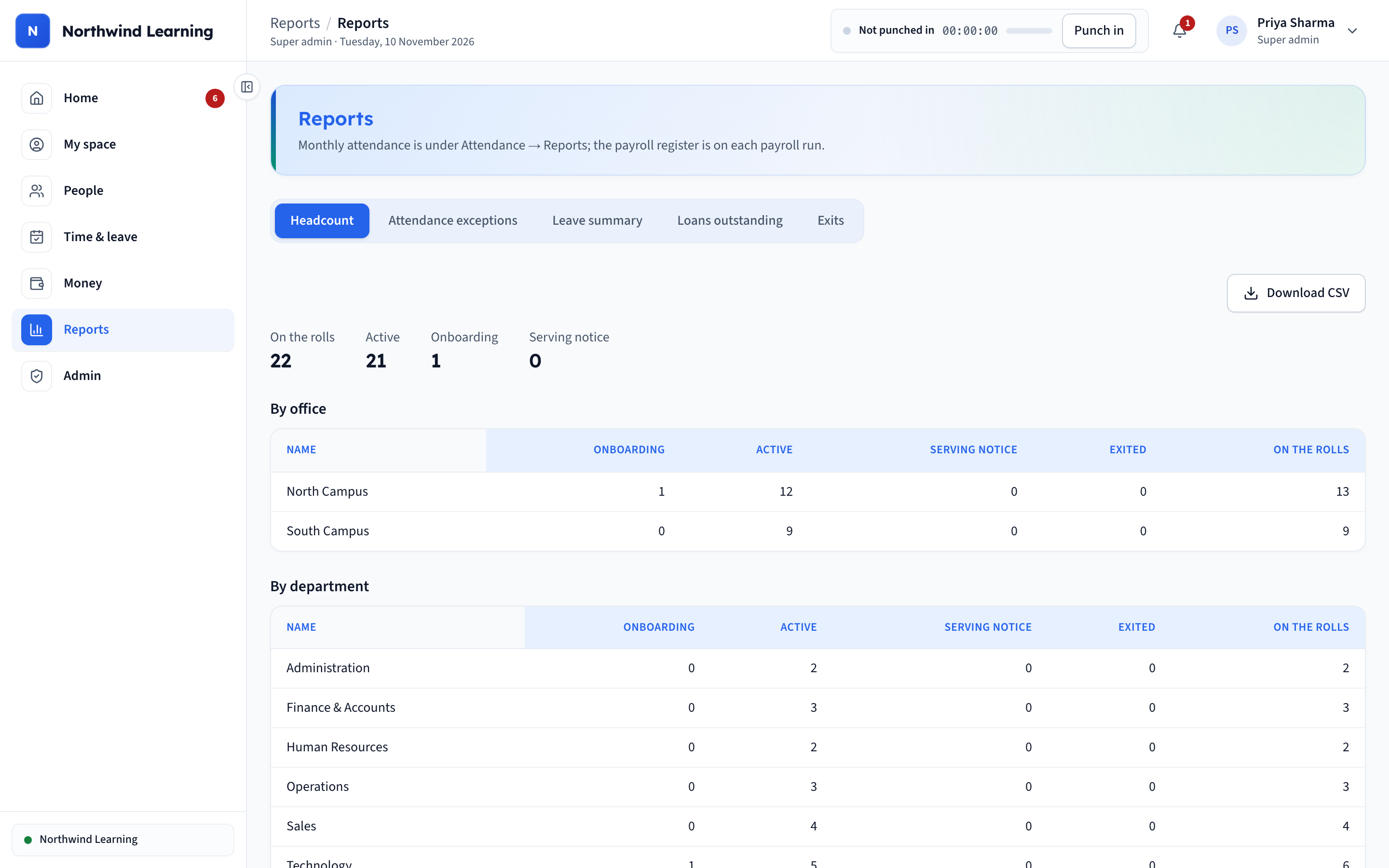
Headcount by campus and department, attendance exceptions, leave summary, loans outstanding and exits, each downloadable as CSV for management meetings.
11
White-label ready
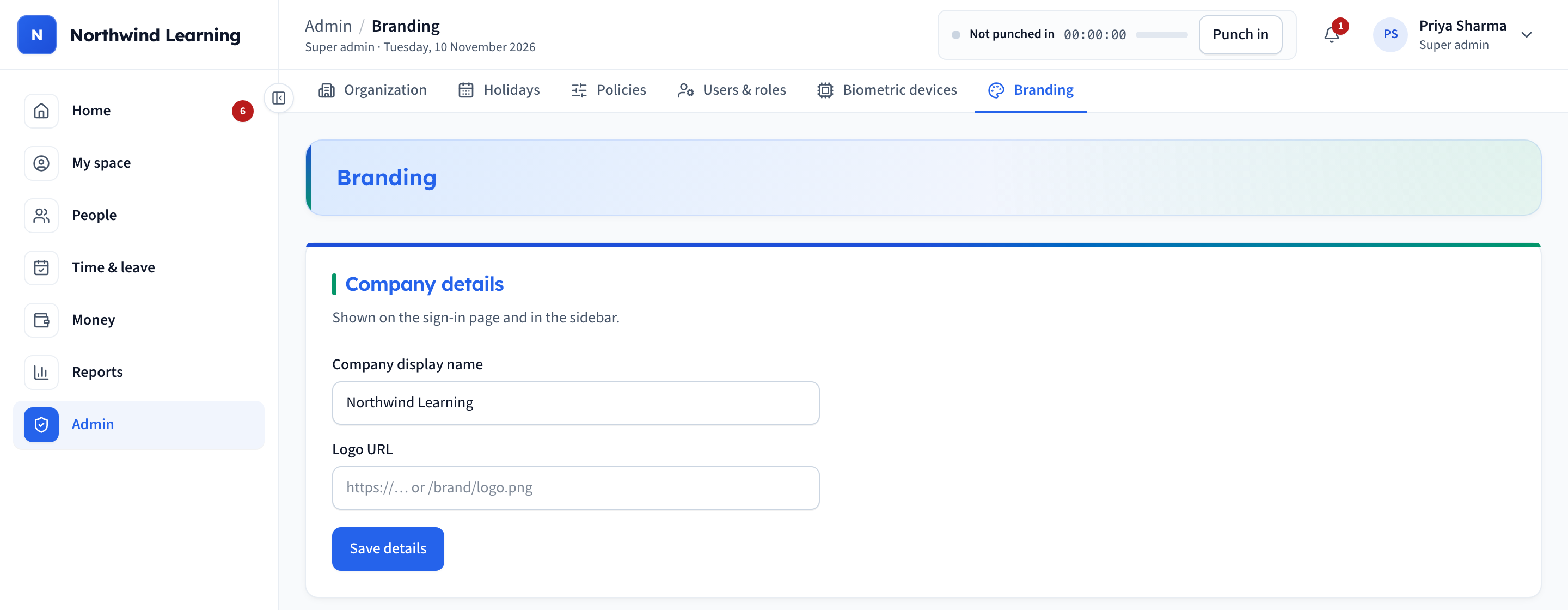
Company name, logo and colour theme change from settings, so the same product ships under any brand.
04 // THE MOBILE APP
An employee self-service app on every phone.
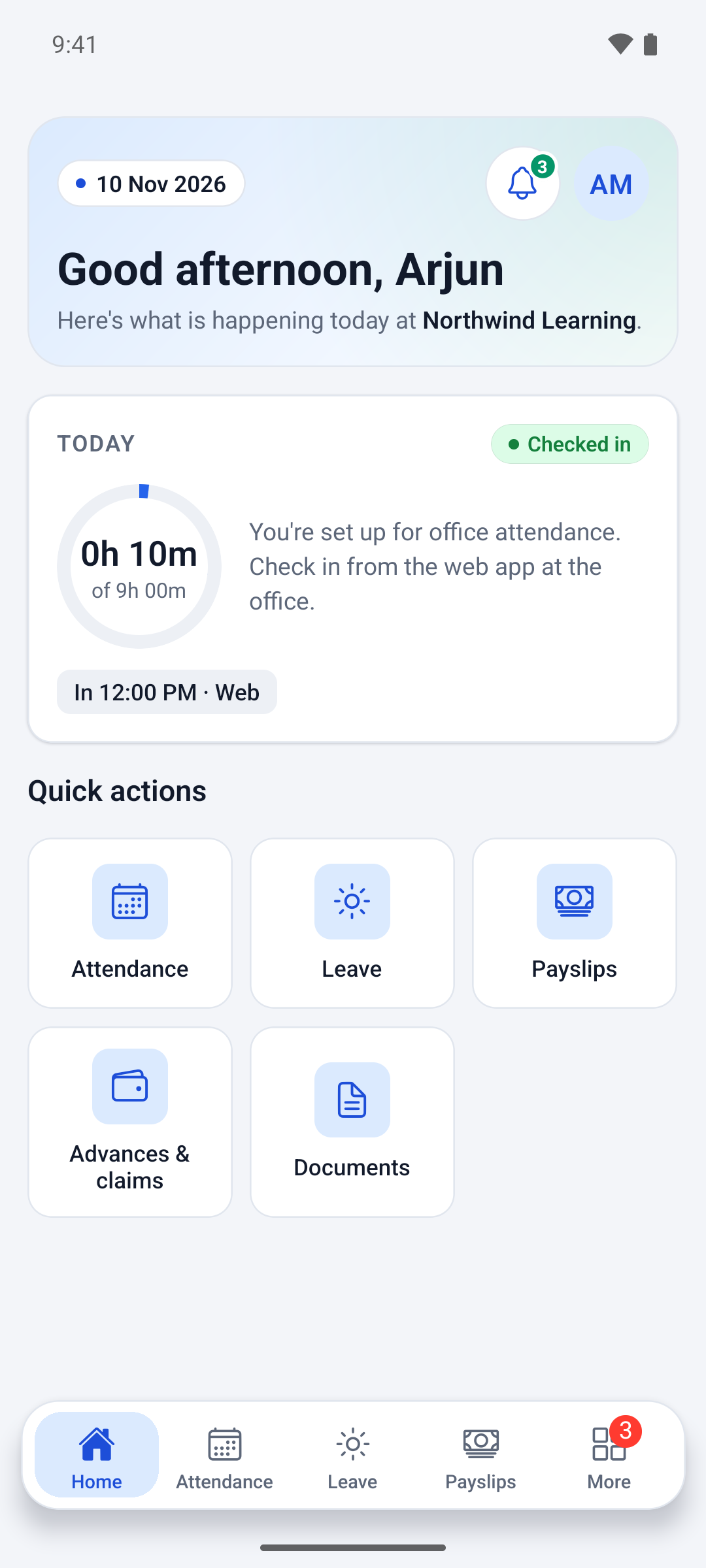
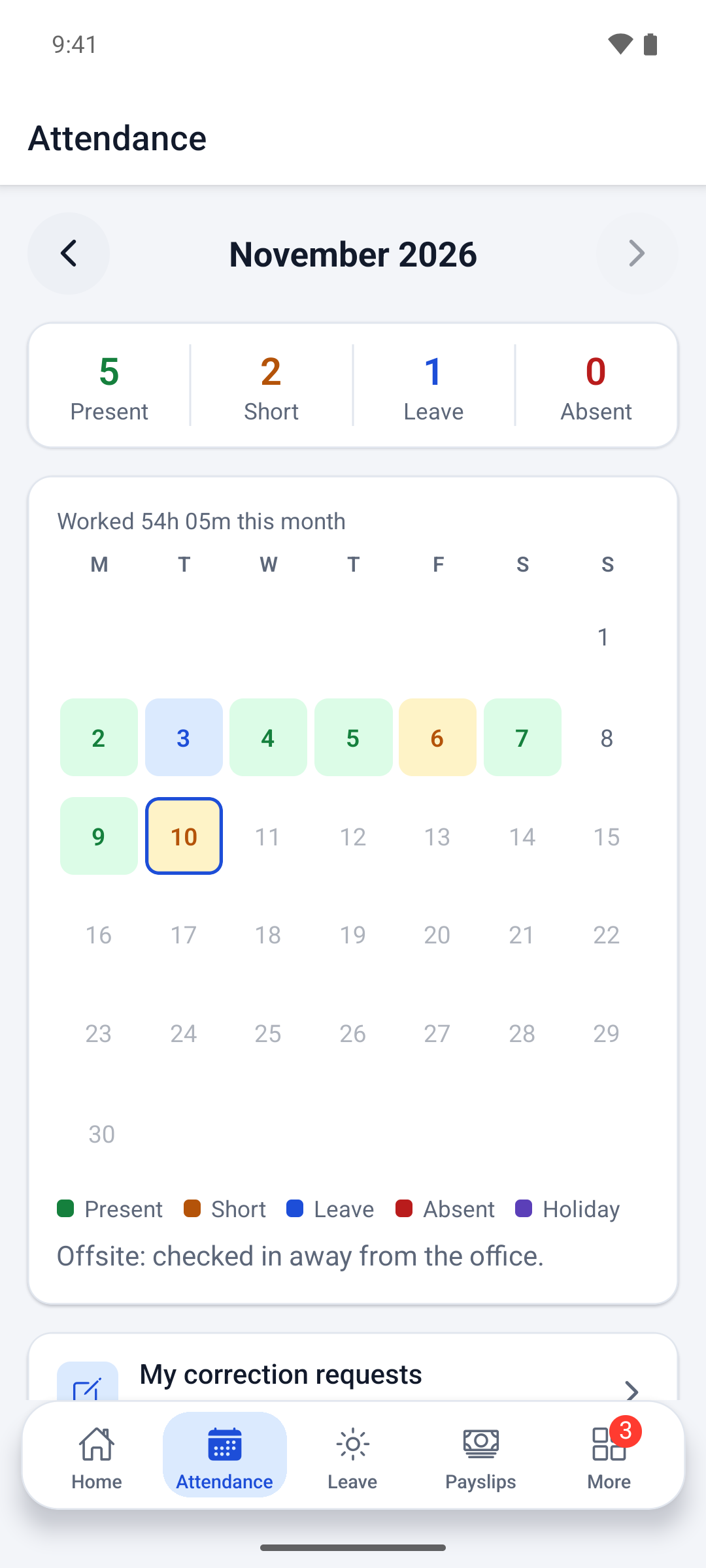
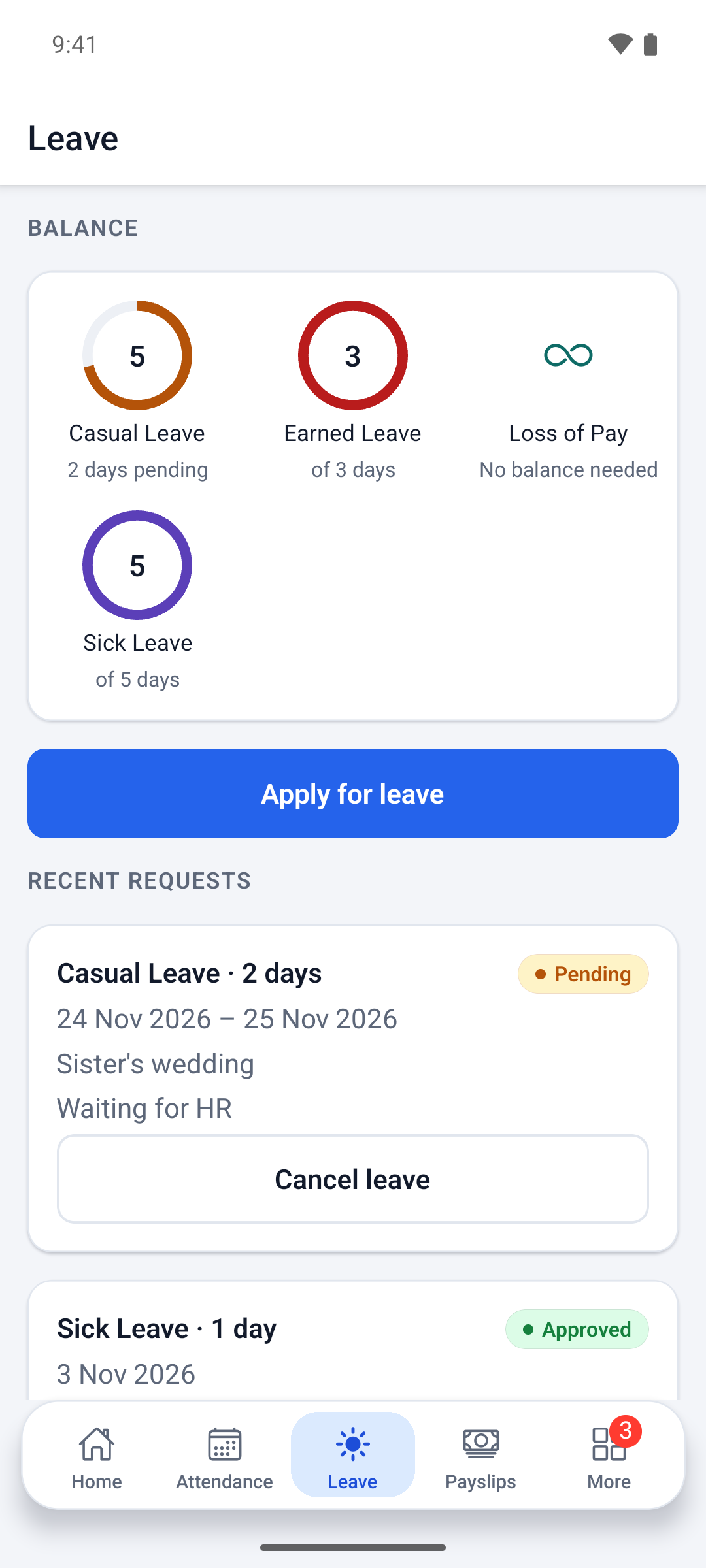
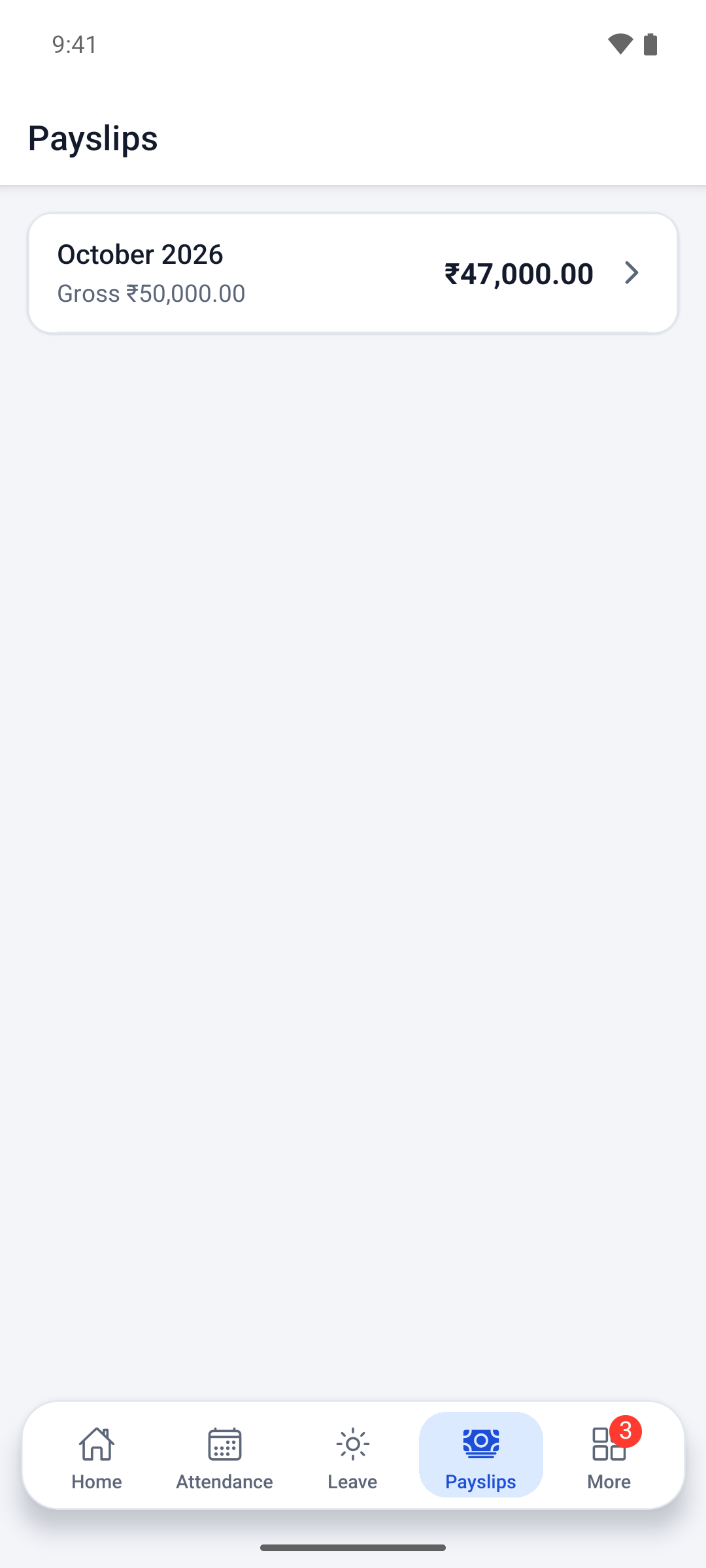
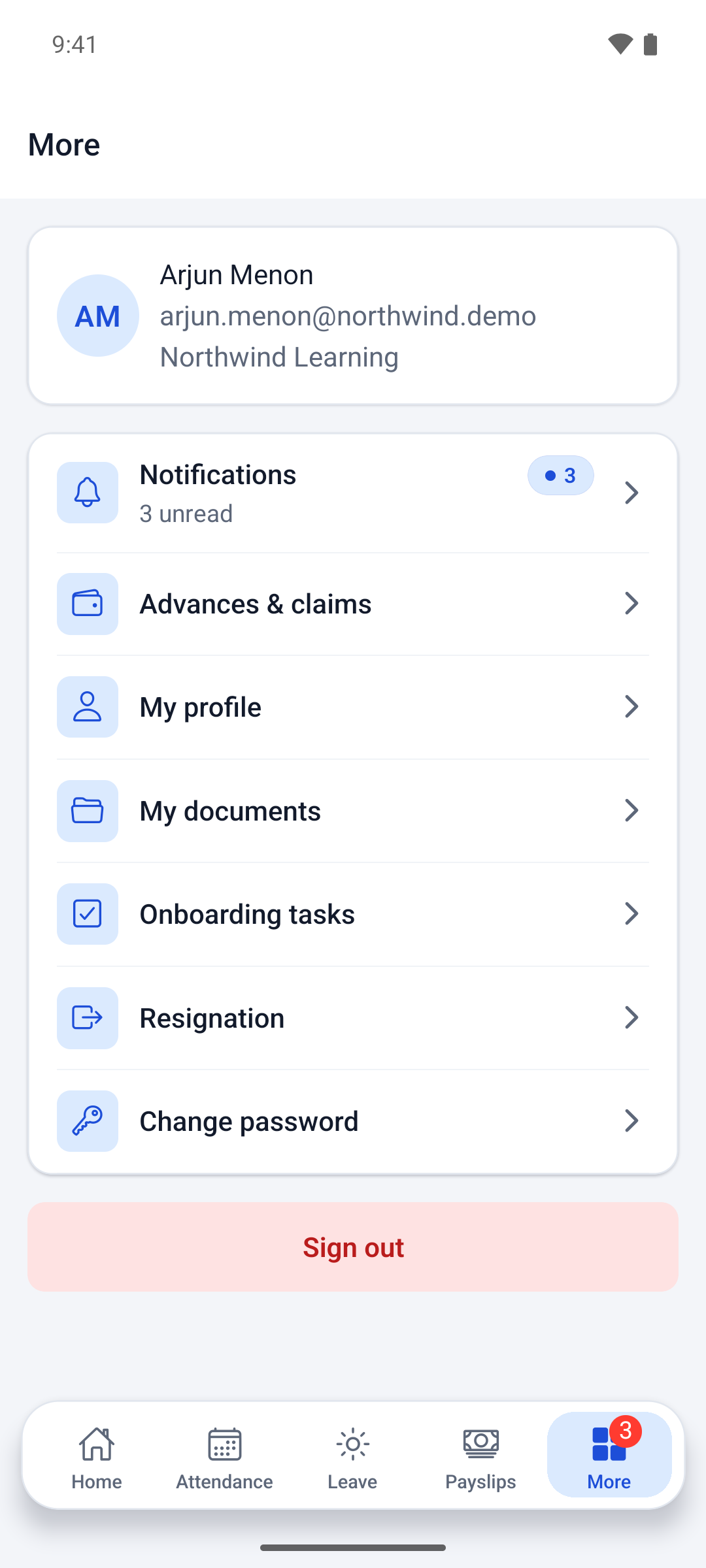
Staff use a native Android and iOS app for GPS punch and push notifications, plus the same self-service in any phone browser. Payslips, leave balances and loan schedules are a tap away, so the questions that used to reach HR now answer themselves.
Home
Punch in or out with GPS and see hours worked today.
My attendance
Daily history and missed-punch corrections.
My leave
Balances, and apply in seconds.
My payslips
View and download every month’s payslip.
More
Profile, documents, advances and claims, and notifications.
05 // HOW A MONTH RUNS
From the first punch to the trial balance.
Payroll is only as right as the attendance under it. Every step below feeds the next one automatically, so nobody retypes a number between them.
01
Punch
Staff punch in on the biometric device, in the web app from the office, or in the mobile app with GPS from a site visit. Every punch lands in one record with its source.
02
Close the day
Each night a scheduled job turns the day’s punches into one attendance day per person: present, short, absent or a missing punch.
03
Fix and approve
Short days are charged to casual leave or loss of pay by rule. Missed punches go back to the employee for a correction request, approved by their manager.
04
Run payroll
HR computes the month. Loss of pay, loan EMIs and salary advances are applied from the records, not typed in.
05
Approve and publish
The super admin approves the run, payslip PDFs are published, and every employee is notified on their phone.
06
Post to accounts
Salaries, loans and advances post to a double-entry ledger, ready to export to Tally for the accountant.
06 // THE RULES WE BUILT IN
Policies written once, applied every month.
The HR policy lives in the system, not in one person’s head. These are the rules the client’s HR team no longer applies by hand.
A working day you set
The standard day, grace minutes and how hours are counted (first in to last out, or the sum of each in-out pair) are settings, not code.
Short days handled by rule
A day under the standard hours is charged to casual leave if there is a balance, otherwise to loss of pay. It can be switched to half-day rules.
GPS punch for field staff only
Mobile punch is open to field and hybrid employees, needs location and a purpose note, and flags punches from mock-location apps for HR.
Office-only web punch
Web punch can be limited to each office’s network, so a laptop at home cannot mark someone present.
A clear loss-of-pay formula
Unpaid days are priced at monthly gross divided by the calendar days in the month, the same way every time.
Indian salary components
PF, ESI, professional tax and TDS are set up as salary components with fixed or percentage amounts, alongside allowances and deductions.
Two levels of approval
Leave, loans and cash requests go to the reporting manager first, then HR. With no manager, they go straight to HR.
Roles that protect payroll
Only the super admin approves payroll and final settlements, assigns roles and sees sensitive employee data. Every change is in the audit log.
07 // TECHNOLOGY
Three clients, one API.
The web console, the mobile app and the biometric devices all talk to one backend, so every punch and every rupee lands in the same record.
Frontend
Next.js (React), TypeScript
Mobile
React Native with Expo, for Android and iOS
Backend
NestJS, TypeScript, PostgreSQL with Drizzle ORM
Integrations
eSSL and ZKTeco biometric (ADMS push), PDF payslips, Tally CSV export, push notifications
Security
Role-based access on every route, encrypted bank details, masked ID numbers, full audit trail
Hosting
Docker, automatic HTTPS, nightly backups
08 // WHERE WE BUILD IT
HRMS for Kerala, South India and the Gulf.
India: Kerala, Bangalore and Tamil Nadu
This build runs today for an employer in Kerala, in Indian time, rupees and Indian salary components. Professional tax and leave rules differ from state to state, so they are settings per office rather than one fixed table.
We build HRMS and payroll software for employers in Kochi, Trivandrum, Kozhikode, Thrissur, Kottayam, Alappuzha and Pathanamthitta, and for teams in Bangalore, Chennai, Coimbatore, Madurai and the rest of South India. Our team works from Infopark, Kochi.
The core of the system, one employee record, one attendance record and one payroll run, carries straight across to the Gulf. What changes is the pay rules: salaries in AED, QAR, OMR or SAR, the Wage Protection System salary file your bank asks for, end-of-service gratuity, and leave and probation rules under local labour law. Arabic screens are added where staff need them.
Those Gulf rules are not part of this Kerala build. We scope them for each country before we quote. Companies in Dubai, Abu Dhabi, Sharjah, Doha, Muscat, Riyadh and Jeddah work with our Kochi team in a shared working day, and we have a UAE office in Al Aliya, Ajman.
Built for education, shaped for any multi-site team.
The same rules engine suits any employer with staff in more than one place, more than one way to mark attendance, and a payroll that has outgrown a spreadsheet.
Schools, colleges and training institutes
Teaching and admin staff across campuses, academic-year holidays, and staff who move between sites.
Rotating duties and night shifts that change payroll every month.
HRMS for hospitals →
Field sales and service teams
Staff who start the day at a customer’s site and punch in from their phone with GPS.
Multi-branch retail and offices
Several branches or campuses with their own holidays, biometric devices and approvers.
10 // At a glance
1 platform
in place of spreadsheets, a standalone biometric machine and manual payroll
3 ways to punch
web, GPS mobile and biometric, in one attendance record
11 modules
from hiring day to final settlement
The client is not named. Screenshots show the demo company “Northwind Learning” with demo data.
FREE DOWNLOAD // 8-PAGE PDF
Take HRMS Suite to your team.
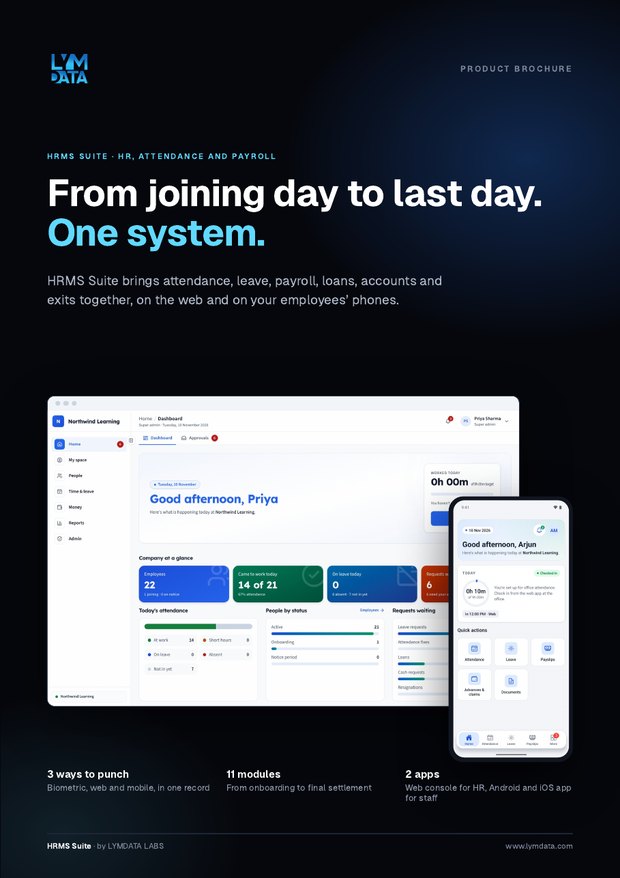
The brochure walks through every module with real screens: attendance from biometric, web and mobile, leave and approvals, payroll, loans, the accounts ledger, the employee app and exits. Share it with your HR, finance and management team.
HRMS Suite is the HR and payroll platform we built for a multi-campus education company in Kerala. It covers employee records, onboarding, attendance from web, mobile and biometric devices, leave, approvals, payroll, loans and advances, accounts and exit, with an Android and iOS app for employees.
The cost follows the complexity of your pay rules, not your headcount, and there is no per-employee subscription. Shift patterns, the number of entities and countries, and device integration move the price. HRMS projects start from ₹1 lakh.
Does it work with our existing biometric machines?
This build reads punches live from eSSL and ZKTeco devices using their push protocol, and ignores duplicates by device serial and log ID. If you use another brand, we check its export or push options during scoping.
How does GPS attendance work for field staff?
Field and hybrid employees punch in from the mobile app. The app records their location and a short purpose note, HR sees the location on the attendance board, and punches from mock-location apps are flagged.
Does it handle PF, ESI, professional tax and TDS?
Yes, as salary components with fixed or percentage amounts that appear on every payslip. This first release does not compute income tax automatically; that can be added where a client needs it.
Can you build an HRMS for a company in the UAE, Qatar, Oman or Saudi Arabia?
Yes. The same core works in the Gulf, with pay rules built for each country: local currency, Wage Protection System salary files, end-of-service gratuity and local leave rules. We work with Gulf clients from Kochi in a shared working day and have a UAE office in Ajman. See software development for UAE businesses.
Do you work with companies in Bangalore and Tamil Nadu?
Yes. We work with companies across South India, including Bangalore, Chennai and Coimbatore, as well as every district of Kerala. Most of the work runs on video calls, with visits for workshops and rollout.
Is this HRMS suitable for schools, colleges and training institutes?
Yes, it was built for one. Staff are grouped by campus and department, each campus keeps its own holiday calendar, and teaching and admin staff who move between campuses keep one record and one attendance history.
Can the HRMS carry our own brand?
Yes. Company name, logo and colour theme change from settings, so the web app and the mobile app look like your own product.
A mobile app for finding and booking family services in the UAE.
BOOK A DEMO
Need an HRMS built around how your team works?
Whether you need to automate an existing process, build an intelligent business platform, or develop a new digital product, we help turn business requirements into software that delivers practical outcomes.
Traditional software gives people tools to perform work. We build software that performs the work.